TikTok Video Downloader
Free TikTok Downloader, Download Video TikTok Without Watermark (MP3 & MP4)
What Is a TikTok Downloader?
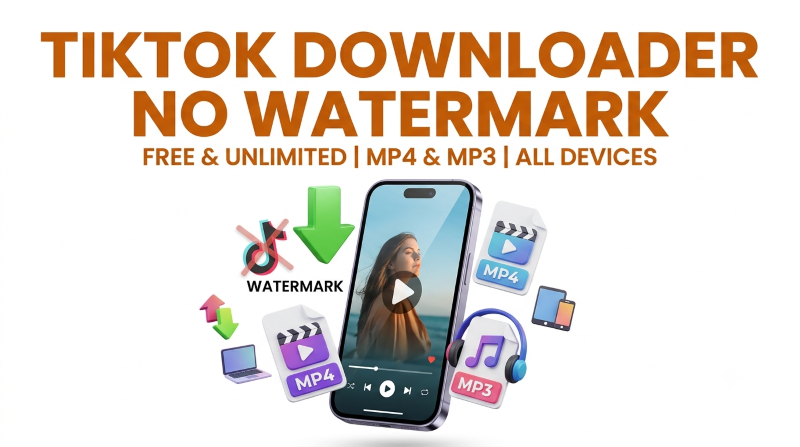
A TikTok Downloader is a free online tool that lets you save TikTok videos to your phone or computer without the watermark. The process is simple: copy the video link from TikTok, paste it into the TikTok video downloader, then choose MP4 if you want the video or MP3 if you only need the audio. Within a few seconds, the file is saved to your device in its original quality.
One of its biggest advantages is that it works entirely in your web browser, so there is no need to install an app. Whether you're using an Android phone, an iPhone, or a computer, the process is the same. Whether you want to download a video, extract the audio, or save a photo slideshow, simply copy the link, paste it into the tool, and download the file.
How to Download TikTok Video Without Watermark
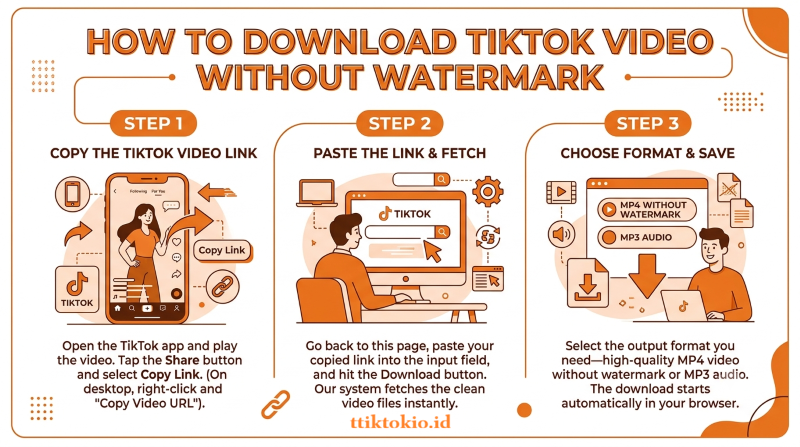
Copy the TikTok Video Link
Open the TikTok app and play the video you want to save. Tap the Share button (the arrow on the right side of the screen) and select Copy Link. On a desktop browser, right-click the video on tiktok.com and choose "Copy Video URL" instead.
Paste the Link & Fetch
Go back to the top of this page, paste your copied link into the input field, and hit the Download button. Our system will analyze the URL and fetch the clean video files instantly.
Choose Format & Save
Select the output format you need—either high-quality MP4 video without watermark or MP3 audio. The download starts automatically in your browser.
Download TikTok Videos on Any Device
Whether you use Android, iPhone, iPad, or desktop, saving TikTok videos without watermarks takes just a few taps.
Save TikTok Video On Android
Copy the link from the TikTok app, open Chrome (or any browser), paste it here, and tap download. Android drops the MP4 straight into your Downloads folder, and your Gallery app picks it up automatically.
Download TikTok Videos On iPhone and iPad
On iOS, Safari does not save videos to your Camera Roll. The file goes to the Files app instead. After downloading, tap the arrow icon in Safari's address bar to find it, then use the Share button and choose "Save Video" to move it into your Photos. Chrome on iPhone works the same way.
TikTok Video Download Online on PC, Mac, and Linux
Grab the video URL from tiktok.com, paste it here, and click download. This works identically in Chrome, Firefox, Edge, and Safari on Windows, macOS, and Linux — there is no extension to install and no desktop software to run.
Why Use This TikTok Downloader?
Here's what actually matters when you compare our TikTok downloader against the rest:
No watermark, no quality loss
If you searched for a TikTok video downloader HD without a watermark, this is exactly that full-resolution save with the logo stripped at the source.
Unlimited downloads
No daily caps, no "premium" tier, no countdown timers.
Works online in browser
There is no need to install any app, so it can't slow down your phone or PC.
MP4 and MP3 in one place
Video and audio from the same input box. Get what you need in seconds.
Every device
Android, iPhone, iPad, Windows, Mac, Linux. One tool, same three steps.
What Quality Do You Actually Get? HD and 4K Explained
TikTok serves the majority of videos at 1080×1920 (Full HD) with a bitrate of roughly 2–4 Mbps. That's exactly what a TikTok HD video download pulls: the original file, untouched, straight from TikTok's servers.
Saving the file with a TikTok downloader keeps the first-generation quality. What happens after that is up to the platform you upload to.
Two honest caveats that nobody will tell you:
- A TikTok video download 4K result only exists if the creator uploaded it in 4K. No downloader can invent a resolution that was never there. If the clip was recorded at 720p, 720p is what you get.
- Re-uploading causes quality loss. If you save a video and post it again, TikTok compresses it a second time. That double compression is why reposts look soft; it's not the download itself.
TikTok Watermark Remover
The floating TikTok logo and username overlay are baked into the video that the app lets you save officially. A TikTok video downloader without a watermark works differently: it fetches the clean source file before the logo is stamped on, so nothing is blurred, cropped, or painted over.
That's why a TikTok file with no watermark stays identical in quality to the original; a proper TikTok watermark remover doesn't edit the video at all.
Most creators download TikTok without a watermark so they can repost their own work on Instagram Reels or YouTube Shorts, where TikTok branding hurts reach.
If you plan to save TikTok videos without watermarks for editing, this also gives you a clean canvas to work with.
Frequently Asked Questions - TikTokio
Yes, completely free with no download limits and no signup.
Copy the link from the TikTok app, paste it here in Safari, and download. The MP4 saves to your Files app first; tap Share and then Save Video to move it into your Camera Roll. The saved clip has no watermark and keeps its full HD quality.
If the creator uploaded in 4K, yes, the tool always fetches the highest resolution TikTok has on file. Most clips exist at 1080p, so that's the typical maximum. No online TikTok video downloader can upscale beyond the original upload.
No. This tool can only access videos that are publicly visible on TikTok. Private accounts, followers-only posts, and deleted clips are out of reach; that's a TikTok restriction, not ours, and it protects creators' privacy.
No, you don't have to pay for anything. Our free TikTok video downloader is always free for everyone.
On Android and desktop, files land in your Downloads folder. On iPhone and iPad, they go to the Files app first (see the iOS guide above). From either place, you can move, rename, or share the MP4 like any other file.